
We have added a
"File|New|Bridge Project" menu option.
This beta is an early look at an exciting new feature, the Project
Plug-in.


In brief, here's how it works:
* Start a new model using the new "File|New|Bridge Project" option.
* Turn on the XY GuidePlane and use the "XYGuidePlane|Move Plane to Joint" to move the XYGuidePlane to the near side of the bridge.
* Click the "Add|Member" button. Add members to the near side of the bridge.
* Do the same thing to the far side of the bridge.
* When finished building your bridge, use the "<" and ">" keys ( the shift key is not necessary) to position the truck on the span.
* Select "Analysis|Run the Analysis".
(If you want to become part of the action, when the truck is on the screen, press the "T" key! If you want out, press "F1".)
We built a truck just like the one in the program using a P370 Basic Car Kit ( from PineCar ) and a block of steel. We built the abutments out of 6"x6" southern pine.
We changed the method
of moving the truck onto the span.
To position the truck use the ">" and "<" keys. Use the ">" (or ".")
key to advance the truck and use the "<" (or "<") to move the truck back
to the start position.
The truck axle loads
are now adjustable.
In case the model truck used is different from the default test truck, we have
made the axle loads adjustable.
A tower plug-in beta
We have included the tower plug-in. Create a tower project set the wind
speed and analyze. Hold on to your hat!
Faster Analyzer
This version allows member offsets and the creation of a section that resembles
a loading block. And its faster.
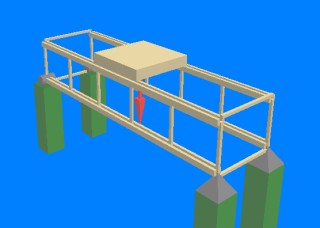
A Vierendeel "Truss" - actually it is a frame ( it has moment resisting joints ) invented by M. Vierendeel of Belgium in 1896.
Yes. ModelSmart3D can analyze it!
New Menu Option Expanded
The "Show Model Weight" menu option now displays in "Member Change Shape Mode", "Members Change Material Mode" as well as the "Member Add Mode".
New Menu Option
"Analysis|Analysis Options|Include Eccentricity at Connections" has been added for all you experts out there. Now ModelSmart3D can optionally consider the extra bending caused by non-collinear member axes. (ie when you glue one member on the outside of another - simulated with the "Member Offset" property in the "Members Properties..." dialog.
New Menu Option
Help menu now has Quick link to ModelSmart3D resources Web page.
New Beta Coming Soon!